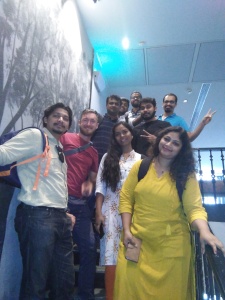
FUDCon Pune 2011

Tags

, ,

Last weekend was the FUDCon Pune 2011. Boy…what an experience! The best technology event I’ve attended so far. Today, after one week, it feels nice to sip hot tea, look back and remember all the things that we did before last weekend.

It started about five months back. Rahul mentioned that he is participating in the bidding for the FUDCon: Fedora Users and Developers Conference, to host in India.
Me: Wow…that’s cool!
Rahul: the venue is going to be the College of Engineering Pune(CoEP); There are lots of things to be done and I’m looking for volunteers to help me out.

Before long I was attending the weekly FUDCon planning meetings with other volunteers. I was to look after the food for the attendees. There were others,
   Amit Shah was to handle the budget for the event.
   Satya took up hospitality, registration, and volunteer coordination.
   Saleem decided to create the event website: fudcon.in for talk submissions.
   Rahul & Kashyap said they could take care of the T-shirts and goodies.
   Suchakra was to design the banners, posters, booklets and T-shirts.
   Shakthi & Shreyank were to arrange Fedora Activity Days and WI-FI.

[!] So the team was in place and things were going ok, little slow initially, but ok. None of us had any experience of organising an event like FUDCon. By the end of July, I started calling vendors to ask for quotations to serve food at the event. I would ask them to send quotation by e-mail and they would ask me to come and meet them in person. Sending quotations by email did not fall in their work flow. Some were too expensive, some only served the vegetarian menu, some said they can not provide the box-packed lunch and would want to set up a buffet. One of them says
Vendor: Sir, would you have any share in the bill? Should I make quotation accordingly??
I was like: Dude, NO!
It was amusing at times. Every Friday we had an IRC meeting with the Fedora Project Leader: Jared Smith, who was overseeing our activities.

As the time progressed, Satya made sure that the international delegates had booked their tickets and had applied for the appropriate visa. Bookings were made at Hotel Cocoon for the delegates’ stay. T-shirt design was selected after a heated debate in one of the weekly meeting. Shakthi organised two Fedora Activity Days as heads-up for the FUDCon. Both of them very were well received. We settled for the Cocoon Catering Services to provide food at the event.

…to be continued.
___
! There were more than 50 other volunteers and one man: Mr Narayan Murty G without whom it would have been impossible to organise FUDCon.

Chuckle

Tags

, ,

I logged-in to feedmug.com today and the first post I see is – Unexected PITA Progress. That’s an intriguing title. And then the opening line just got me, I couldn’t move ahead without reading the full post. Rarely do you come across a straight confession of ones disappointment in his work and yet the tone has a hint of confidence in it. Half way through the post it reads

After an initial development rush in 2006, I hit the wall and struggled to make progress in the face of problems like having no version of Perl on Windows with a compiler, the difficulty of embedding custom POE applications into regular applications, and the mind-bendingly awful problem of debugging code being run via a shell command from a different version of perl in the child of a fork spawned from a script called from a boot init script in a headless VM called from system command in the hidden fork child from an async loop spawned in a deep object model in the child fork of a daemon.

That’s a long sentence! :) Nonetheless, authors perseverance is awesome!!

FUDCon Pune 2011

Tags

YEH! I'm attending FUDCon Pune 2011! :)

FUDCon Pune 2011

The Fedora Users and Developers Conference in India, is happening in the city of Pune. :)

It is scheduled from Fri Nov 4′th to 6′th 2011; At College of Engineering Pune.

FUDCon Pune is going to be the largest gathering of the worldwide community of Fedora developers and users. :)

Fedora is a Linux-based operating system that showcases the latest in free software. Fedora is always free for anyone to use, modify, and distribute. It is built by people across the globe who work together as a community.

See you there! :)

Caching Woes

Tags

An year ago, around this time, I started working on feedmug.com – an RSS feeds reader that aims to provide the best reading experience. After 6 months of development and using, feedmug.com was launched in March 2011.

  https://pjps.wordpress.com/2011/03/15/introducing-feedmug-com

Since then, slowly but steadily, it has been growing good. Recently feedmug hit its first roadblock when the hosting provider stopped its back-end caching server saying, “excessive resource usage on a shared hosting“.

The thing is, feedmug has a list of RSS feeds for which it maintains the local cache. User requests are served from this local cache so that the response time is minimum. The cache needs to be kept updated all the time, which is done by the caching server.

I’m working on replacing the current caching server with a new one, which should consume minimum system resources. Hope it all works out well.

Till then, feedmug won’t be able to display the updates count next to your feeds. But if you click on the feed, it’ll always fetch the latest posts and news for you.

I’m extremely sorry for this inconvenience. :(

Multiprocessing with xargs

Tags

The other day I was to run a command multiple times with different input parameters and take notes. Each command would take few hours. Say, you’ve a bunch of e-books scattered around a 5TB hard disk. You’ve to pick few selected ones and find their corresponding hardbacks on Amazon. You have a script to do that. I started running it, but it’s so distracting, just after 2-3 times you go – what the hell am I doing? Can’t I just tell someone to schedule these commands? So I started writing a Python script with a list of dictionaries holding input parameters and multiprocessing to run the commands, 2 or 3 at a time. But that is so boring. I wanted something real quick, simple and sleek. I remembered Xargs.

  Xargs(1): build and execute command lines from standard input.

Xargs(1) does just what I wanted, exactly the way I wanted. I had seen one liners using xargs, but never used it myself. So I spent some time collecting all input parameters in a text file, and then, voila!

  $ xargs -rtP3 -L1 -a cmd.sh env
   -r : tells xargs not to interpret blank lines,
   -t : tells xargs to print the input commands as they are invoked
   -P3: to start 3 processes at a time
   -L1: tells xargs to interpret each line as a single command
   -a : to read the input file instead of the standard input.
   env: is the command to which each input line is passed as parameter.

I really like it when tools behave exactly how I want them to. Bliss! :)

Old habits

Tags

Hmmn, recently I started using the j & k keys to scroll up and down on the computer screen. Boy…it’s such a bliss, seriously!

If you see $ vimtutor, on the very first page it says, use j to scroll down and k to scroll up. But all this while I kept using the arrow keys and never realised that j & k could be so powerful. As they say – old habits die hard.

Their power comes from the fact that, invariably the right hand rests on the keyboard such that the j & k keys fall under your middle and the ring finger, which means, you don’t have to reach out to the arrow keys. Also, these keys are universally supported. You read man(1) pages, perldoc(1), pydoc(1) pages, pipe some output to less(1), see output of an SQL query in MySQL, anything, even epdfview, the PDF reader I use supports these keys. Only piece missing was Firefox. Firefox does not support j & k keys to scroll web pages. I wonder why not?

But then, Firefox has this rich set of extensions which is like a magicians hat. One can always find something useful there. I found one such jewel which does exactly what I wanted – vimkeybindings. It adds 6 key bindings to firefox – j, k, l, h – help you scroll the web pages and – g, G(shift + g) – help you reach to the top or bottom of the page.

With that missing piece in place, it feels wonderful to browse through web pages. :)

GNU Pem-0.7.9

Tags

,

Hi,

I feel happy to share with you that the latest  version of GNU Pem, version 0.7.9, is now accessible from its website -> http://www.gnu.org/software/pem.

GNU Pem is a handy tool to help you keep track of your personal income and expenses.

Major changes:
1. New option -b –bare, to show concise reports suitable for small netbook screens. See -> https://www.gnu.org/software/pem/pem-nano.png

2. New user guide: https://www.gnu.org/software/pem/pem-nano.html

It began with a message from Mr. Ernest saying he has compiled GNU Pem for the Nanonote Netbook, but it doesn’t show up well because of the small screen size. After exchanging a few more messages about the possible solutions, we settled on adding a new option that’ll remove the existing tabular format so as to make the report fit in 40×15 screen of Nanonote.

I added the new -b, –bare option to generate the new report and gave a pre-release version to Mr. Ernest. He confirmed it’s working via twitter -> @pjp_ PEM 0.7.9 looks like a success to me!

  Nano report -> https://www.gnu.org/software/pem/pem-nano.png

After this started a new exercise of making an official release. Considering the last release was almost two years ago, now I had lost my GPG key that was registered with the GNU servers. So, it all began from creating a new key, registering the same with the GNU servers, uploading the new tarball to the ftp server, pushing changes to the git repository, and lastly making changes to the Pem web site.

Yay…! :)

A trek and GNU Pem

Hi,

A few days ago, over dinner, Anurag mentioned the trek to Kalsubai. Instantly, the trekker in me was excited. At 1600 metres, Kalsubai is the highest peak in Maharashtra. The four of us, me, Satya, Shreyank and Satchit decided to go from Pune. Now the question was: How do we go? Because all the buses running from Mumbai were booked. And booking a taxi for four people, to and fro, would have been a costly affair. After some discussion cum contemplation we decided to go on bike. :)

So, the plan was to touch the Pune-Mumbai highway, NH4, by 11:00hrs. on Saturday(July 2′nd) morning and reach Bari village, near Ghoti, by 19:00hrs. But ah, it was just a plan. We were still in Pune till noon, having breakfast and filling up Petrol. My bike’s meter read: 50202km. By the time we touched NH4 near Wakad, it was almost 13:00hrs. From there it was a smooth ride. Weather was cloudy, but pleasant. We, running at constant speed of 70kmph, reached Lonavala just before 14:00hrs. There, a stop for some Chai was not a bad idea, plus Shreyank had an emergency to attend to. As we left Lonavala, clouds were flying low with slight drizzle here and there. Just outside Lonavala, we stopped again in the ghats to savour the beautiful view. There, Shreyank found a picturesque donkey to click a portrait of. From there on NH4 was silky smooth, at least it felt so till we saw NH3 after Kalyan. But that’s for later.

At Lonavala, we had covered not even 1/3rd of the distance. We had to hurry up. So, without wasting any more time(except while retracting couple of kilo-meters on the Express Highway, because bikes are prohibited on it.) we sped across Panvel, riding through the pouring rains, to reach Mumbra-Kalyan exit, at around 17:00hrs…I think. We stopped there to have lunch, and boy what a lunch, seriously! I savoured the hot Puri-bhaji with extra helpings of Puri, while Shreyank finished his Chole-Bhature and Satchit his Punjabi Thali. Plus of-course Chai was to follow. Satya had decided to observe fast for Saturday(God knows why?). With our lunch, rain had stopped. We, once again wore our astronaut suits(jacket + rain pants + helmet + glasses:) and set forward through the crowded streets of Kalyan. It was a real breather to finally touch NH3 to go towards Igatpuri and Ghoti.

Boy…what should I say about NH3? If NH4 was silky smooth, NH3 was way-way more so. Trust me, the last I remember seeing NH3 was, some 15 years ago when I took a bus from Nashik to Mumabi. At that time, it was a narrow two lane highway, with no connection to the words *smooth & silky* for long-long distances. But today, it’s a four lane mega highway with wide divider in place.We rode at more than 80kmph, non stop, for close to 1 to 1+1/2 hours to reach to Igatpuri. Seriously, the transformations the NHAI has done to the national highways in past few years, are just amazing and impressive. From there, Ghoti is some 10-12 kms, while we reached there, it was close to 20:00 hrs. We had covered around 268kms from Pune. All of us were tired and I was dying for a cup of Chai. We asked for the directions to the Bari village and the fellow very casually said – go straight, take the second right, go for some 2-3kms, again take right and go another 15-17kms inside from there. – I was like, dude, are you serious?:) We still had to go some 20 kms inside on the state high way. And everybody was like: STILL 20 KMS? Why-why-why?? :) So we decided to have dinner instead of just Chai and then go forward. Here, The Sai Darbar hotel, at the Sinnar-Shirdi exit, turned out to be a nice place for dinner. They served hot Pithla-Bhakri(Bajra roti) with butter and a spicy green chilli chatni – aka Thecha. In the cold rainy weather that was outside, it was the best combination you could ask for. By the time we finished dinner it was around 21:30hrs. and we still had some 18kms to go. These might be the scariest 18kms I’ve crossed so far. As we left the National Highway, the road became narrower, just enough for one car to go, plus it was pitch dark and cloudy, and no sign of life in any direction whatsoever. We managed to reach Bari village at around 22:30-ish, and then started the haggling for a place to stay. As we contacted Mr Santosh Khade, our local contact, he said the place he had arranged for us, the village school classroom, he just gave away to some other party. After haggling for an hour or so, we finally got the classroom for ourselves and Shreyank lighted the mosquito coils to mark our occupancy. :) I don’t remember falling asleep; But when I woke up at around 6:30hrs, couple of buses had come from Mumbai, and local village women were banging the common hand pump to fetch water from the earth.

There were no toilets to go to, so we got ready in no time. Pohe and Chai was served for breakfast. Slowly, one by one, groups of people started moving towards the peak of Kalsubai. Almost all of them were young, between 20-30 age group. Anurag ushered us towards the peak, we followed. It was a pleasant morning, with chickens running around in the muddy pathways and cats looking at them curiously. Nobody could figure out where we had to go, for clouds had covered half of the mountain. Plus everybody was little extra-cautious not to slip and get dirty, but alas, they were the ones to fall first(read Satya :) ). As we climbed up, there were couple of plateaus from where one could easily see the distant mountains and waterfalls. Enjoying these views, we kept moving forward. After about 3 hours, just before the peak, there was this inviting fragrance of Chai(or maybe I just imagined it). But still Chai was there, with the surprise of hot Onion Pakode. After savouring some 7-8 plates of Onion pakode with 15 cups of Chai, we moved ahead. There was a steep ladder at the end to reach the top. At the peak, there is a small temple of the goddess Kalsubai, and a small plateau which could accommodate some 70-80 people at a time. From the top, the view was like nothing I had seen before. Winds were blowing at more than 70-80 kmph, while clouds were flying from below to the top. Everybody was tired, yet happy and cheerful to be there. Some where taking pictures, while others were shouting slogans. A few others were looking for a cozy spot away from all the noise and yet a few others were ensuring they don’t get one.:)

After spending about 40-45 minutes there, we started the march down. It was close to 13:00hrs. Coming down was equally difficult as going up, for one wrong step and you wouldn’t be standing up to take the next one. I think Shreyank and Satya could elaborate more on this. :) After about two hours, Satchit stopped at one of the waterfalls to take a shower, while we reached down to the class room, where lunch was being served. Though I was happy to have completed the trek, yet part of me was already occupied with the thoughts of a strenuous bike ride back to Pune. While others changed gears and finished lunch, I collected my bag and got ready with the bike. Around 16:30hrs. we were back on road again, this time towards Pune via Sinnar. From Ghoti, Sinnar is around 49km. And from Sinnar, Pune is around 180-190kms. Thankfully, road was excellent throughout the journey. We reached Sinnar in about 40-45 mins and stopped for Lunch after another 8-10 kms, at Hotel Atithi, Pure veg, for it looked decent enough to have proper restrooms. But nope, that was not to happen! Everybody was visibly tired and almost ready to crash, if only we had an option. But there was none, because we had to reach home before late.

After the lunch of Tomato Uthappa, Plain Dosa, Bournvita, and Chai, we left Sinnar at around 18:40hrs. Sun was setting at a distance, and darkness was following it’s routine. The tricky part about Nashik-Pune highway is that it has just two lanes and very high heavy vehicle traffic. By the time it was completely dark, we had crossed Sangamner, and it was getting difficult, almost impossible to see anything with the dazzling headlights of the vehicles coming from the opposite side. We stopped for yet another Chai, just before the Chandanpuri ghat. By this time, everybody’s backs were giving in. Sitting on the bike was getting unbearably difficult. Yet, there was no option but to go on. With the night settled in, I was getting worked up about riding on the highway, for it was the first time I was riding at night on a highway and at times it was very difficult to see anything. I wonder if they have night vision glasses, like they have for Solar eclipse, which could reduce the dazzling lights of the opposite vehicles to mere dots, and help you see your way through the dark. It they do, I think it’s high time they should start their mass production; And if they don’t, I think here is a nice business idea for a start-up, no?

Anyway, so from there we decided to stick together and not overtake any vehicles at random. We crossed the Chandanpuri Ghat and again picked up the speeds of 60-70kmph, which was necessary if we had to reach home in time. Most of the time we were riding through the dark. Occasionally a small town would throw in some light for a while. Constantly, riding at 50kmph, we crossed Narayangaon and stopped again for Chai. The watch showed 20:30 or 21:00hrs I think. From there Pune was still 75kms to go. It was a restaurant with lodging facilities. Shreyank said, “Here is a plan – let’s stay here tonight, we’ll get up at 6′O clock tomorrow, ride 75kms and go to office. ” which was quite reasonable, considering how tired all of us were, and how difficult it was to sit on the bike(especially Satchit). Anyway, though reasonable, we decided against staying there and moved on. After Narayangaon, the road is quite better, for there are small towns of Rajgurunagar and Manchar nearby, and after that road becomes a four-lane highway, smooth as silk. Once on the four lane highway, we again touched the constant speed of 70-80kmph and before long we reached near Bhosari. From there, Shreyank knew a short-cut which brought us to Vishrant Wadi. From Vishrant Wadi, we touched the Airport, Viman Nagar, Kharadi, to home sweet home at midnight. :)

My bike’s meter read: 50748km. That’s about 550kms in two days. :)

Next morning I reached office around 10:30hrs with my body aching everywhere. And in my inbox, there was a mail which was to make all my pains go away, like instantly. It read…

Hi, I’ve recently compiled GNU Pem for the Nanonote, an entirely open sourced platform Palmtop Computer from Qi Hardware ( http://en.qi-hardware.com/wiki/Ben_NanoNote ).

It runs great and has much usage on a device like this, for which we would all like to say a big THANKS.

GNU Pem on the NanoNote

feedmug.com: forgot password?

 Hi,

   Yesterday I pushed a password recovery feature to feedmug.com. Now users can reset & recover their password in one simple step. Thanks to Sachitanand for the patch that made it happen.

It’s an interesting story. At first, when I was the only user of feedmug, password recovery was not required. But when I released an early version for few friends and colleagues, I realised that it was necessary. But at the time I was so occupied with adding checks and validations, testing & re-testing site function, fixing bugs etc. and etc. that I thought I’ll do it later. Then one day Sachitanand asked if he could do something…anything. I said sure, write a Perl script to set password and send an email notification to the user. By the time he finished that script, I had done the domain registration and feedmug.com was ready to go live. The script was ready, but we did not have an interface to make use of it. Neither did I have the SMTP configuration for feedmug.com. So feedmug was launched without the ability to recover user’s password. I thought nobody is going to forget their password within days and we’d get some time to put things together. I was proved wrong the very next day, when Saleem – one of the early user – said he forgot his password and can not log-in to feedmug.com.

After the launch, though I had time on hand to fix it, Sachit had become father and gone home to see his family. While he came back, I put together an interface to accept user’s email address. But we still did not have SMTP configuration to send email notifications. Last week-end, finally, I had all the things in place and it was time to integrate Sachit’s patch and test it with the SMTP server. I manually integrated the patch on my local instance, did test-run it for couple days and then pushed it live on feedmug.com. In the end, it was quite easy to make things work together.

Hope you find it all useful.


http://feedmug.com is a feeds reader which aims to provide you the best reading experience. If you still haven’t tried it, I invite you to do so, I’m sure you’ll like it. If you are an existing user, please help me spread the word by telling your friends about it.

Thank you. :)

Introducing: feedmug.com

    Hi,

Once again I’m writing after long-long time here. But boy, it feels great today. For today, I introduce you to

feedmug is an RSS feeds reader that’s been occupying my hours lately. It all started sometime in the October of last year, when ask.com decided to close down Bloglines. I used to like Bloglines. But by the time it was bought over by MerchantCircle, I’d switched back to Google reader, though there’s something very distracting about it. Before long I switched to Liferea, and then to Sage extension. In less than 15 days I had jumped from one reader to another and yet none of them seemed very good. Sometimes it surprises me how quickly I give up things or give up on things. Anyway, so that’s when I started working on – Feeds reader.

Today, after six months, I’m really happy to see how it has shaped up so far. And I think may be you would find it useful too.

feedmug supports:

  • RSS/Atom/RDF feed formats.
  • import & export functions.
  • Handy keyboard shortcuts.
  • Custom themes.

Known issues:

  • Limited usage of CSS.
  • Uses html tables for page layout, which sort of restricts the scope for theme creation.

These issues are there, because when I started, I barely knew how to write HTML, let alone JavaScript and CSS and sessions and cookies etc. I was more of an accidental web developer than a pro. My goal was to get myself a decent feed reader. Now since that is done, we can surely leverage on it and look forward to some nice changes and features in the future.

Overall – feedmug aims to provide you the best reading experience possible.

With that, I would like to invite you to give it a try. I’m sure you’d find it useful. If you have any comments or suggestions please do let me know, I’d be glad to hear them.

My sincere thanks to everybody who helped along with their critical inputs and suggestions. And special thanks to Kushal for being a generous hosting provider, and to Satya for the logo design.

Thank you. :)

PS: I’d really appreciate it if you could help me spread the word about it.

Follow

Get every new post delivered to your Inbox.